New Tickets can now accept both credit card payments and cash at the venue. Attendees can choose how to pay for their ticket and each registration option from the payment methods the organizer offers.
Attendees could already choose how to pay for registration options and can now do the same for event registration itself.
Other updates
New[Organizer Console] You can now download a saved version of the program and abstract collection as a single JSON file.
Improvement[Organizer Console] The updated layout makes registration survey question sets easier to edit.
Improvement[Organizer Console] The updated layout makes announcements easier to create.
Improvement[Organizer Console] The updated layout makes sessions easier to create and edit.
Improvement[Organizer Console] The updated layout makes presentations easier to create and edit.
New [Organizer Console] Organizers can now set the visibility of the program and abstract collection independently.
Other updates
Improvement[Organizer Console] When choosing an event’s check-in method, you can now read a description of each option.
Improvement[Organizer Console] Event access and preview access passwords are now easier to distinguish in the settings.
Fix[Organizer Console] Access passwords no longer appear as configured before they have been saved.
Fix[Organizer Console] Events whose listings have ended now display the correct publication status.
Fix[Organizer Console] In registration, check-in, and abstract submission lists, filter options that do not fit on screen can now be reached by scrolling.
Fix[Organizer Console] You can now close the discard confirmation and return to editing a registration survey question set.
New [Organizer Console] You can now manage versions of your program and abstract collection together.
Previously, you could not create drafts separately from the published program and abstract collection. You can now edit without changing what is publicly available and save your changes as a new, unpublished version.
Each version has a password-protected preview URL. Organizers can share it for review, then choose a version to make publicly available when it is ready.
Other updates
Improvement[Organizer Console] The registration list now opens with the most recent registrations first.
Improvement[Organizer Console] The checked-in attendee list now opens with the most recent check-ins first.
Improvement[Organizer Console] In lists such as registrations and abstract submissions, moving between pages now automatically scrolls to the top.
ImprovementLabels indicating required fields and input requirements are now easier to read in dark mode.
Fix[Organizer Console] Switching languages in a form no longer shifts input fields because of differences in required labels.
New [Organizer Console] Organizers can now change the display order of tickets. The saved order is reflected in the attendee ticket list as well as organizer lists and summaries.
Other updates
Improvement[Organizer Console] Existing program settings can now be edited together on a single screen.
Improvement[Organizer Console] Newly created registration surveys are now automatically added to the ticket you are editing.
Improvement[Organizer Console] Actions such as editing notes and canceling registrations are now grouped in one menu in the registration list, where it is also easier to see which registrations have notes.
Improvement[Organizer Console] Following the addition of Free as a payment method, prices can no longer be set to zero for other payment methods.
Fix[Organizer Console] You can no longer select the cancellation action for registrations with cash already collected on site. If cash remains collected after check-in is canceled, the reason is now shown.
Fix[Organizer Console] Event names in breadcrumbs now consistently use the event’s primary language, fixing an issue where the language varied between screens.
FixAn issue where part of the header could disappear when returning to My Page on an iPhone has been fixed.
ImprovementMultiple-choice answers in registration surveys and abstract submissions now have an improved display style, making them a little easier to read.
ImprovementWhen leaving a registration survey with answers you have not submitted, a confirmation now appears asking whether to discard your input.
ImprovementChanging your email address now requires you to re-enter your current password to confirm your identity.
Improvement[Organizer Console] When presentation numbers are duplicated while saving an abstract, it is now clearer which presentation number needs to be corrected.
FixMy Page and the organizer console’s registration lists, CSV exports, and check-in screens now show the original purchase amounts even if ticket or registration option prices change later.
FixThe credit card registration screen now shows payment deadlines for provisionally purchased tickets and registration options in your device’s time zone. You can also check the corresponding time at the event location.
New After the abstract submission deadline, users who submitted an abstract can now request changes to its content. Organizers can review the changes and the reason for the request to decide whether to approve it. Approved changes can also be applied to any abstract collection or program that has already been published, either as submitted or after adjustments by the organizer.
Note: If the abstract collection has already been published, the current system applies changes directly to the published data. Version and draft management features are planned for abstract collections and programs in the near future. Once available, you will be able to choose between "Apply to published data" and "Apply to draft." We will share more details at a later date.
Other updates
New[Organizer Console] Organizers can now choose whether to make the abstract collection publicly accessible or limit access to registered attendees.
New[Organizer Console] Organizers can now set separate sales deadlines for registration options, such as a reception dinner, independently of the ticket itself. Individual option deadlines are not yet displayed on attendee pages.
New[Organizer Console] Organizers can now sort the registration list by registration time and the checked-in attendee list by check-in time.
ImprovementReceipts can now be issued in English.
Improvement[Organizer Console] Organizers can now check the submission and last edited times for each abstract on its detail page. The abstract submission list now displays 100 entries per page, up from 20.
Improvement[Organizer Console] The improved announcement audience interface makes it easier to configure recipients and check the recipient count.
ImprovementAccount settings are now grouped in a menu, giving My Page a simpler appearance.
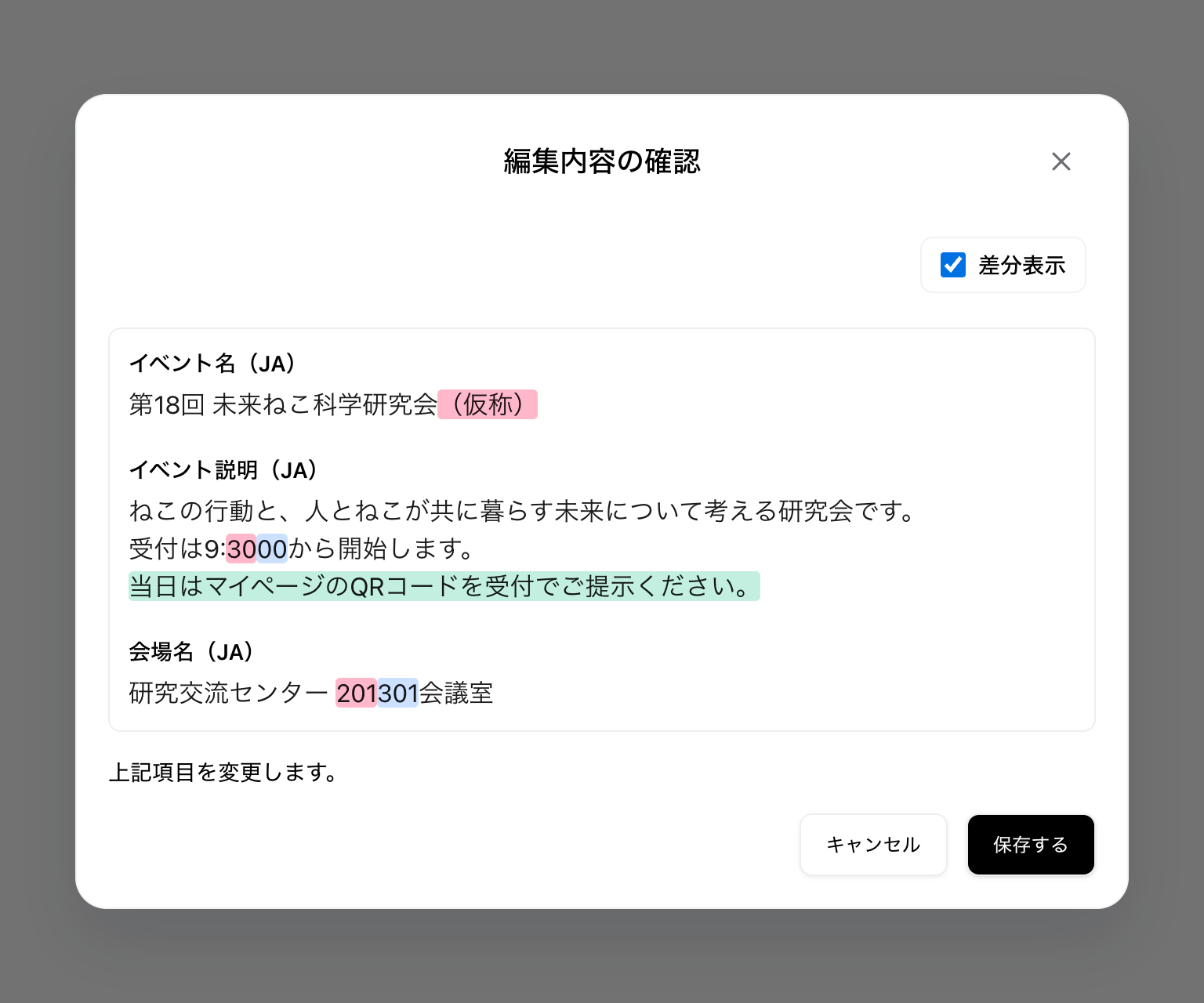
ImprovementSwitching diff display modes in the edit confirmation dialog no longer causes layout shifts.
Improvement[Organizer Console] Error messages shown when publishing an abstract collection now provide more detail, making it easier to identify issues that need attention, such as presentations without assigned numbers.
Fix[Organizer Console] An issue where the registration list could, in rare cases, keep showing previous results after searching or filtering has been fixed.
ImprovementOrganizers can now choose, for each abstract submission form, whether to send notification emails when acceptance decisions are finalized.
NewFor events using name badge check-in, organizers can now reprint badges for attendees who have already checked in, without canceling their check-in.
ImprovementFields and controls in the event settings and abstract submission form editors are now organized more clearly, making configuration easier.
ImprovementA warning now appears before saving overlapping presentation times within a session. Intentional overlaps, such as poster presentations, can still be saved after confirmation.
FixOn mobile timetables, the red current-time indicator now appears at a position that reflects the elapsed time within the ongoing session.
ImprovementFor Japanese-only and English-only events, attendee pages and program and abstract PDFs now use the event's language, regardless of your language preference. Name badges downloaded by attendees also use the event's primary language, regardless of your language preference.
ImprovementThe fields and sections in the ticket creation and editing form are now organized more clearly.
FixAn issue where unchanged text appeared as a change on the event edit confirmation screen has been fixed.
FixThe background and logo on the account registration completion screen now display in appropriate colors in dark mode.
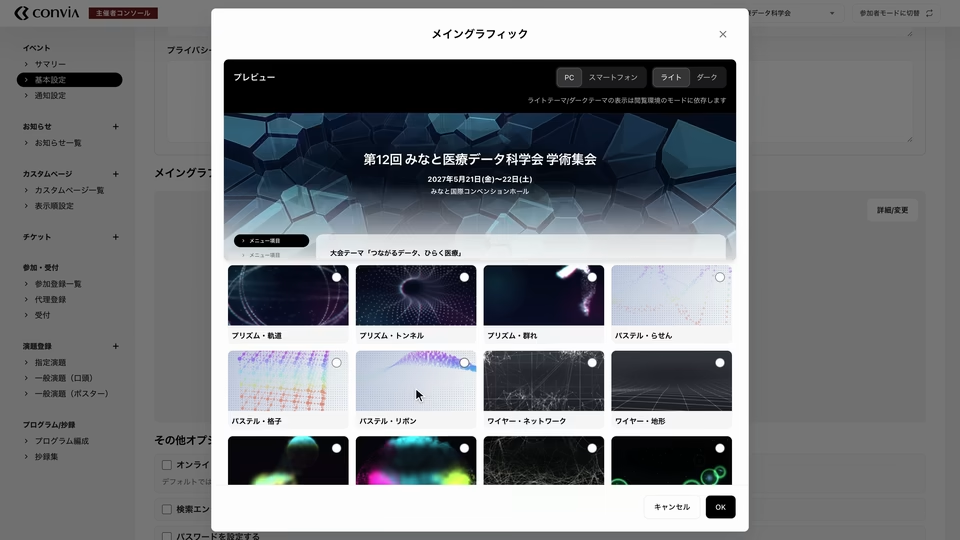
New Choose an animated graphic that matches your event’s theme and atmosphere.
Your chosen graphic is exclusive to your event while in use, so graphics used by other events are unavailable. We’ll add new graphics based on your requests—let us know if you have a motif in mind.
New In the organizer console, you can now register multiple email recipients and choose which notifications each one receives. This lets you match notifications to your team's responsibilities—for example, sending event registration notifications to the secretariat and abstract submission notifications to the program coordinator.
You can register up to 10 notification recipients per event. For each recipient, you can choose from five notification types: event registrations, registration option additions, abstract submissions, abstract withdrawals, and tickets reaching capacity. These settings are available under “Notification settings” in the organizer console.
Other updates
NewIn the organizer console's basic event settings, you can now restrict attendees from registering with multiple ticket types.
ImprovementAdding and editing registration options in the organizer console now uses a modal instead of a separate page, so you can work without leaving the ticket editing screen.
ImprovementName badges and participation certificates printed from the organizer console's reception screen now use the event's primary language.
ImprovementIn the attendee abstract viewer, the side panels no longer appear slightly clipped at the screen edges, and you can click them to move to the previous or next abstract.
FixAbstract submission forms for attendees no longer display links to programs that do not exist.
New Organizers can now specify which tickets make attendees eligible to submit abstracts for each submission form. Multiple tickets can be selected.
Organizers can also choose whether the form is visible to people who do not meet the ticket requirements. To let people review the submission guidelines before registering for the event, you can make the form available for viewing only.
Other updates
ImprovementWe have standardized the terminology used for abstract submissions across screens and notifications. In Japanese, labels such as “演題募集” and “応募” now use “演題登録”.
FixUnnecessary cash payment instructions are no longer displayed for free event registrations or when adding free registration options.
New Convia now supports setting and collecting registration fees in foreign currencies. You can use it for conferences held overseas and events that accept registration fees in a foreign currency.
Together with the time zone settings added last week, this arrived just in time for an international conference whose registration opens next month. We would have liked a little more breathing room, but for now, we're relieved to have made it.
Moving to Stripe and re-registering your card
Improvement To support foreign currencies, we have moved credit card payments from fincode to Stripe. Our previous provider, fincode, could only handle Japanese yen, so we needed to rework the payment system.
As part of this move, please re-register your credit card, even if you had already saved it in Convia. We apologize for the inconvenience.
We knew from the outset that we would need foreign currency support, but when selecting our payment platform, we overlooked the fact that fincode only supported Japanese yen. The migration resulting from this oversight took a considerable amount of time and delayed work on new features. We apologize to everyone who has been waiting for them.
We also faced an operational challenge with fincode: the consumption tax rates applied to payment processing fees were a black box, and the information was not disclosed even when we asked. This meant we could not determine the total processing fee until a payment had been made. We expect the move to Stripe to improve this as well.
Other updates
NewOrganizers can now add custom questions to abstract submission forms. Multiple-choice checkboxes and multiline text fields let you ask about preferred presentation dates and other details.
NewOrganizers can now disable automatic receipt issuance for each event. Use this setting if you issue receipts separately.
The abstract submission deadline for your next international conference is Friday at 5 p.m. But that's 5 p.m. at the venue. What day and time is that where you are…? Convia can help with the time zone math.
Starting with today's release, organizers can set a time zone for each event.
Event pages viewed by participants display dates and times in the time zone chosen by the organizer. Hover over a date and time (or tap it on a smartphone) to see it converted to your own local time zone.
For organizers
NewYou can now choose a time zone in the event's basic settings. Ticket sales periods and abstract submission periods can also be set using dates and times in that time zone.
For participants
ImprovementRegistration periods, submission deadlines, program schedules, and other dates and times on event pages now appear in the event's local time.
ImprovementPayment completion dates and times, including those in your payment history, now appear in your device's time zone.
My Account now shows your unread announcements. Until now, what organizers sent through the announcements feature could only be seen in email or on each event page. From now on, My Account also lets you notice when a new announcement has arrived.
For participants
NewMy Account now shows up to three unread announcements, newest first. Opening an announcement marks it as read and removes it from My Account.
NewAdded an Announcements page that lists all announcements addressed to you, including ones you have already read. You can open it from My Account. It shows every announcement you have received so far, unread ones included (unread announcements are marked with a red dot).
My Account now shows your recently viewed events. Links to events you haven't registered for yet make it easy to return to one that caught your eye. Events you viewed before logging in also appear in the list after you log in.
This update also adds per-ticket tax rate settings and brings comprehensive improvements to the organizer console's readability and usability.
For organizers
NewYou can now set a tax rate for each ticket and registration option. The tax rates set here are reflected in receipts.
ImprovementAdjusted text sizes and spacing across the organizer console's editing screens, lists, and modals. More information now fits on each screen, making it easier to see the overall picture.
For participants
NewAs mentioned above, My Account now shows recently viewed events you haven't registered for yet.
ImprovementFixed flickering header buttons when navigating between My Account and event pages. The header's Account button is now disabled while you are on My Account.
For organizers and participants
FixAffiliations entered in presentation author details are now included when you save the author, even if you haven't confirmed them yet. If an affiliation cannot be saved because it exceeds a character limit or violates another requirement, focus returns to the affiliation field so you can correct it there.
ImprovementCancellation-related buttons, such as those for discarding unsaved changes or withdrawing announcements, now consistently use red.
Japan is about to head into a long holiday. It's standard practice in web service operations to hold off on production deployments right before one, but every Convia release goes through multiple layers of automated testing and quality checks by our QA staff before it reaches production, so we're shipping updates as usual. Besides, our CEO will be around over the holidays anyway.
Now, here's a summary of the main updates we've released over the past few days. Starting with this release, we're trying out labeling each item as New, Improvement, or Fix.
For organizers
NewAdded custom pages. You can create pages with any content for each event and place them anywhere you like in the event page menu. Version management and checking a page at a preview URL before publishing are also supported.
NewYou can now choose who receives an announcement. Target specific groups of participants by ticket or registration option. We plan to make recipient selection even more flexible in the future.
NewAdded registration questionnaire management. Registration questionnaires were already available, but you can now easily edit their content from the ticket editing screen in the organizer console.
NewYou can now cancel a specific participant's registration options (such as a banquet) from the registration list. Currently, this is limited to options paid in cash on site whose payment has not been received yet.
ImprovementIn presentation author settings, authors are now reordered by dragging instead of using buttons.
FixFixed an issue where role presets such as "Chair" sometimes did not appear right after the initial program setup.
For participants
NewWhen there are unread announcements, a red dot now appears in places such as the side menu of the event page. Opening an announcement's detail page marks it as read. Previously, the full text of every announcement was shown on the list page; as part of this update, the list and detail pages are now separate.
FixRegistration confirmation emails for free tickets and registration options no longer include payment instructions.
FixCard payment deadlines and password setup link expiration in emails are now written as a period, such as "within 60 minutes of registration" or "7 days from issuance," instead of a date and time. This ensures the deadline is conveyed correctly regardless of the recipient's current time zone.
FixThe on-site cash registration completion screen now shows the price of each selected registration option.
Over the past week, we've added several features and made minor improvements.
Here's a summary of the main updates.
Organizer console updates
Added an option in the event's basic settings to automatically end publication of event information after the event ends.
Updated the tools for creating and editing abstract submission forms. It is now easier to configure call details, submission deadlines, categories, character limits, and other settings.
Updated the abstract collection management screen to make it easier to assign and reassign presentation numbers in bulk. Presentation number settings have moved from the submission list and detail screens to the Abstract collection screen under Program/Abstracts.
Clearer change previews
Improved the change preview shown before saving, making edited sections easier to identify.
Name badge printing fix
Fixed an error that prevented name badge printing for events without Japanese enabled in their basic settings.
Login screen styling updates
Fixed layout issues on devices with small screens, such as the iPhone SE (2nd generation).
Also updated the animation displayed while login information is being submitted.
Registration questionnaires let organizers ask attendees to answer questions prepared in advance when they register for an event. You can collect additional information to help plan your event, such as whether attendees are joining for the first time, whether they would like lunch, or how they heard about the event.
Previously, questionnaires supported single-line text answers and single-choice answers. We've now added two new answer formats:
Multi-line text answers
Checklists
Try the new answer formats to help your event run smoothly.
Convia is an event management system for academic conferences and meetings. From publishing the event page to registration and payments, calls for abstracts and acceptance decisions, the program and abstract book, on-site check-in, and announcements to attendees, you can run everything an event needs in one service.
What we have cared about most is keeping the operation simple as features grow. Attendees can open an abstract straight from the timetable, and organizers can select several sessions in the program editor and move them together with drag and drop. We build Convia so that first-time users never get lost.
Convia is currently available in Japanese and English.
These release notes will announce new features and improvements as they ship. For the official release, we have listed the features available today, separated for organizers and attendees.
Event pages and publishing
Publish what attendees need to know, from the overview and schedule to the terms, on a single event page. Content can be prepared in both Japanese and English, and viewers switch the language themselves.
[Organizer]
Edit basic information such as the event name, overview, dates, venue address, and map. The map is generated from the address, and the pin can be adjusted by hand when the address alone does not place it correctly.
Post the participation terms, cancellation policy, privacy policy, and legal disclosures on the event page.
Check the public URL, and hide the event from search engines (noindex) if needed.
Add a viewing password to open the event only to invited people.
[Attendee]
See the event overview, dates, and venue, and open Google Maps from the venue link. To add the event dates to Google Calendar, use the link on the registration completion screen or in My Account.
From the event page, access registration, the call for abstracts, the program, the abstract book, and announcements.
[Common]
Japanese and English are supported. Event information can be registered in both languages, and viewers can switch the display language.
Registration and payments
Set the fee, capacity, and registration period, and Convia handles registration, payment, and receipt issuance automatically. Organizers only need to check the list and the summaries, which greatly reduces the administrative work around registration.
[Organizer]
Create, edit, and delete tickets. Set the price, capacity, sale period, visibility, and payment methods, and registration opens.
Add registration options to each ticket, such as a banquet, with their own price and payment methods.
Registrations, sales, collection rate, and check-in rate are summarized automatically by ticket and by payment method. There is no need to recalculate them in a spreadsheet.
Search and filter the registration list, and check questionnaire answers, payment status, and selected options on the spot.
Download registration data as CSV. You can choose the columns, split questionnaire answers into columns, and export in Shift_JIS.
Keep organizer-only notes that attendees cannot see, for sharing individual circumstances among staff.
Cancel a registration. If it was paid by credit card, the full refund is processed automatically.
Register invited guests on their behalf and assign free tickets. They receive a password setup email and can start right away.
[Attendee]
Check the price, sale period, availability, and payment methods, answer the questions, and register. The whole process is completed on the web.
Choose options when registering. Options you need later can be purchased from My Account.
Pay by credit card or in cash on site. Once your card is saved, you do not need to enter it again.
A credit-card payment that stopped partway can be resumed from My Account.
Issue a PDF receipt with the addressee of your choice. Your online payment history is also available in My Account.
Check your registration details and payment status in My Account.
[Common]
Confirmation emails are sent automatically when registration is received or a credit card payment is completed.
Abstract submissions and acceptance
From the call for abstracts to the acceptance notification, everything is handled within Convia. Submitters can edit their own submissions until the deadline, so there is no need to exchange emails to swap files.
[Organizer]
Review submissions in a list for each call. Filter by submission or acceptance status so that unreviewed submissions are not overlooked.
Check the title, abstract, authors and presenters, affiliations, biographies, photos, and other submitted details on a single screen.
After the deadline, mark submissions as provisionally accepted or rejected, individually or in bulk, then confirm them all at once. Decisions can be revisited until they are confirmed.
Assign presentation numbers to accepted submissions. The numbers appear in the program and the abstract book as they are.
[Attendee]
Check open calls, their deadlines, and submission requirements.
Submit an abstract following the fields defined for each call. Authors and presenters, multiple affiliations, biographies, and profile photos can be registered and reordered.
Abstracts accept mathematical notation (TeX/LaTeX style). A preview shows how it renders, and a help page explains the notation.
Review your submission on a confirmation screen before submitting. Until the deadline, you can edit or withdraw it yourself.
Your submission and its acceptance status are available in My Account at any time.
[Common]
When acceptance decisions are confirmed, submitters are notified by email automatically, so no one misses the result.
Programs and abstracts
Assign presentations to venues and sessions, and the timetable is published on the web as is. The abstract book is available on the web and as a PDF, so there is no need to prepare separate print files.
[Organizer]
Set the dates, venues (tracks), default session duration, categories, and participant roles.
Create, edit, and delete sessions. Besides the time, venue, language, and category, you can set chairs and speakers, related links, and individual presentations.
Import submitted abstracts as presentations and assign them to sessions. Presentations that did not go through a call can be created by hand.
Move sessions on the timetable with drag and drop. Select several sessions to change their times together, zoom the view, and search presentations.
Publish or unpublish the program. Changes after publication appear immediately, so there is no need to distribute a revised version.
[Attendee]
Browse the timetable by date and venue, switching between an overview of the whole program, a detailed view, and a view for smartphones.
While the event is in progress, the current time is marked so you can see what is happening right now.
Check the session summary, venue, participants, related links, and individual presentations.
The abstract book shows presentation numbers, authors, affiliations, presenter photos, and mathematical notation. Move between abstracts, or open one directly from the timetable.
[Common]
Generate and download the program and the abstract book as PDFs, separately or combined. There is no need to prepare separate print files.
On-site check-in
Scan-and-go QR check-in with the iOS app and pre-printed name tags that double as certificates of participation cut down on queues and roster checks. Cash collection on site is supported too.
[Organizer]
Choose the check-in method for each event: manual only, QR code check-in, or pre-printed name tags.
Search the check-in list and filter by ticket, option, payment status, and check-in status.
Check attendees in, or cancel a check-in, from the web as well. This also suits small events that do not use the app.
For cash payments on site, confirm the amount due and its breakdown before checking in. Options can be added and the extra fee collected on the spot.
Scan an attendee's QR code with the iOS check-in app, confirm their details, and check them in. There is no need to search through a roster.
Issue an event-specific login QR code for on-site staff, so you can hand over check-in without sharing the organizer account.
Issue name-tag PDFs from the check-in screen, including for attendees who did not print one in advance.
[Attendee]
Show the check-in QR code in My Account and you are checked in.
Download a name-tag PDF in advance that doubles as a certificate of participation. Printing it and bringing it along makes check-in smoother.
Announcements
Announcements are posted on the event page and emailed at the same time, so they reach every attendee.
[Organizer]
Write announcements in Japanese and English and post them on the event page. On publication, an email is sent to everyone registered at that moment.
Check email delivery by the number of targets, accepted, pending, and failed messages.
Withdraw a published announcement.
[Attendee]
Read published announcements on the event page. Even those who register later will not miss them.
Receive announcements for the events you have registered for by email.
Accounts
Organizers and attendees use the same account.
[Organizer]
In the organizer console, switch between the organizations and events you belong to. Switching to attendee mode takes one click.
[Attendee]
Check your registrations and payment status, submitted abstracts, and current and past events together in My Account.
[Common]
Sign up with email verification. Based on your email address, AI suggests profile details from publicly available information online, which reduces typing.
Register and edit your profile (name, kana, English name, phone number, affiliation, department, and position). Once registered, it can be used for any event.
Log in, set, reset, or change your password, and change your email address.
View the Terms of Service and Privacy Policy, and accept them again when they are updated.
Contact and support
Questions about usage, bug reports, and feature requests can be sent from the contact form.
[Common]
While logged in, there is no need to enter your contact details. For questions about an event, you can attach the event name or URL, which makes the situation easier to explain.